The desktop is the dashboard
My wallpaper is a screenshot of a web page. Every five minutes an HTML page is rendered headless to a 3000×2000 PNG and set as the actual Windows wallpaper, and every icon on the desktop has been moved into a seat painted on it. That is the whole mechanism, and the interesting part is how many better-sounding ideas had to be thrown away to get to something that cheap.
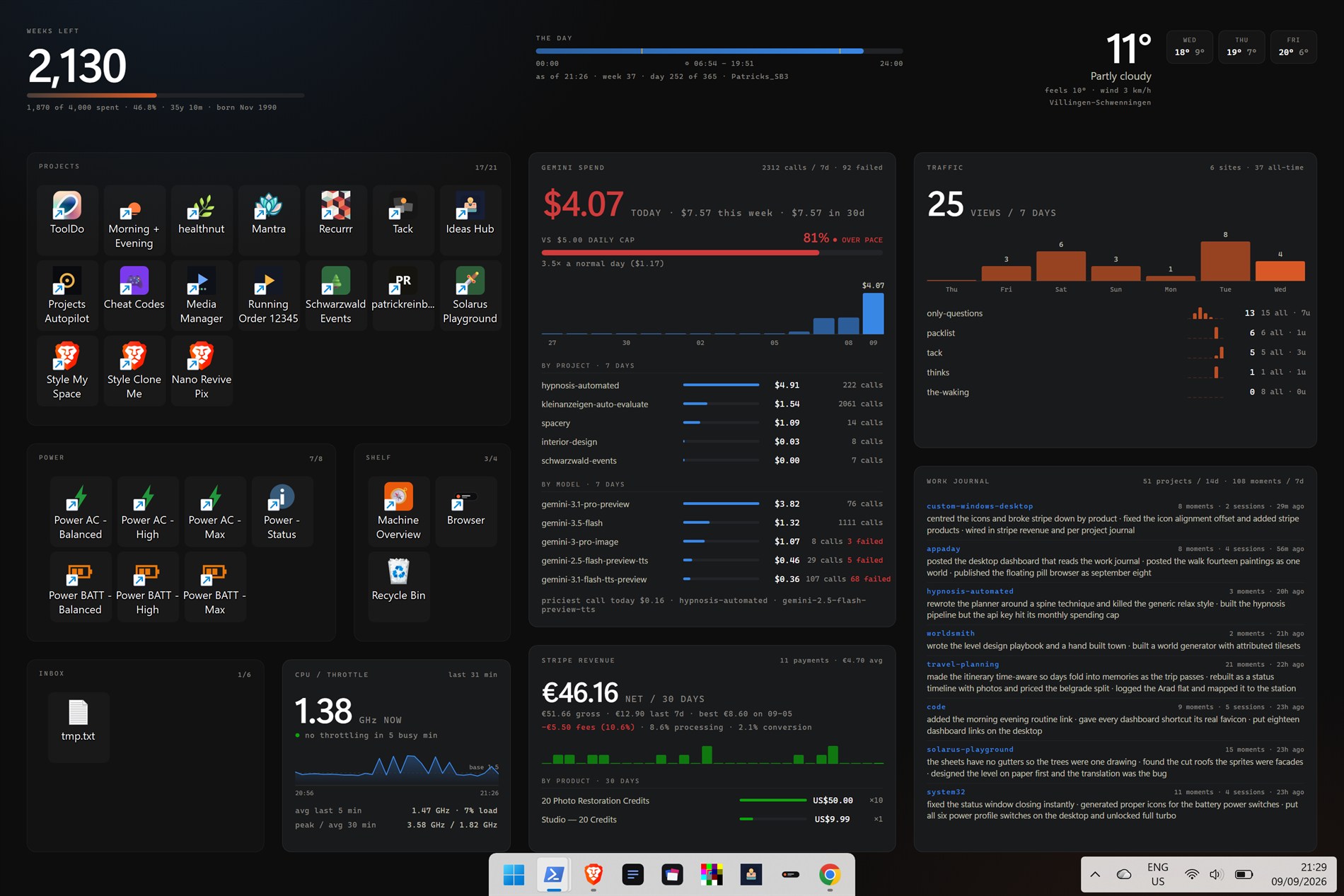
Three approaches thrown away
Third-party mods. The starting question was whether Windows 11 could still be customised at all. It can — but the first tool tried to read my location on launch, which is not what a taskbar mod needs, and nobody is auditing the popular ones. So that route ended early and the taskbar changes are plain registry edits with the originals saved next to them.
The camera as wallpaper. Somewhere in the middle came can one make the back
camera be the wallpaper? just as a fun experiment
, which works: you parent a browser
window into WorkerW, the layer Explorer keeps between the wallpaper and the
icons, and it renders behind them. Live video on the desktop. It also did not survive
hibernate, needed a supervising process, and ran the camera continuously for a picture
nobody looks at directly.
Snapshots instead of a stream. The fix was we might as well just use the
snapshot as the windows wallpaper and change it every so often
— followed
immediately by so we dont need the chrome process anymore lol
. That second
sentence is the whole project. Setting the real wallpaper instead of hosting a
browser means there is no window, nothing to supervise, icons composite on top
correctly, and it survives hibernate and reboot for free.
Once that was true, the picture no longer had to be a photo. The photo background
was fun for a bit but let's instead custom render a dashboard.
One file decides where everything is
layout.json holds the panel rectangles and the icon zones, and it is
read by two different programs: the page that draws the dashboard, and the PowerShell
that moves the icons. A seat painted on the wallpaper and the icon sitting on it
therefore cannot drift apart — there is only one set of coordinates. To rearrange the
desktop you edit that file and nothing else.
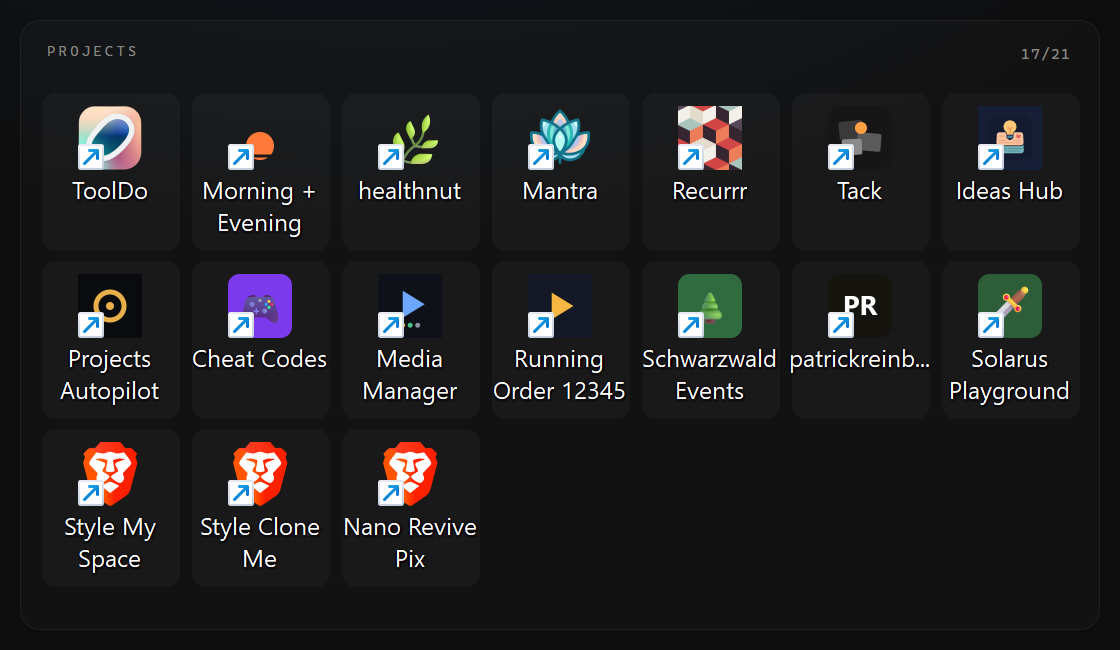
Pixel-exact placement only works because Align icons to grid is switched off;
with it on, Explorer snaps every icon to the nearest cell and the seats are decorative.
The placer reads the positions back after setting them and says so — the log line is
placed 28 of 28 desktop icons, all pixel-exact — because a silent failure
here looks exactly like success until you glance at the screen.
Which it did, an hour after this page first went up: the icons had drifted visibly while the stored coordinates were still correct, so the dry run cheerfully reported every one of them as already in place. Explorer had simply stopped drawing them there. Nothing needed recalculating — re-issuing the same positions put all 28 back, and a diff of the screenshot against the wallpaper it sits on now puts the average icon half a pixel from the centre of its seat.
Any icon no zone claims goes to a zone marked as the overflow, labelled INBOX. A file saved to the desktop tomorrow lands in a seat instead of on top of a panel.
The page checks whether it fits
A screenshot never scrolls, so anything past a panel's bottom edge is silently gone —
the worst failure mode available, because the picture still looks fine. So the page
measures its own panels on every render and writes the verdict into its
<title>, which the renderer reads back out of the browser before
saving the PNG. It logs FIT OK, or it names the offender:
FIT OVERFLOW: GEMINI SPEND +27px.
Seven sources, and what happens when one is down
Weather, Gemini API spend, my own sites' traffic, machine and CPU, Stripe revenue,
and the work journal. Each is fetched in its own try, and a failure keeps the
previous value and marks that panel stale — 3h old
— rather than blanking
it. A dashboard that goes empty when a key expires is worse than one that admits it is
looking at an old number.
The CPU panel is the one I like most for what it refuses to do. This machine exposes no usable temperature — the WMI thermal zone returns access denied without elevation and the ACPI counter reads a flat zero — so rather than print a plausible fake, throttling is derived from clock speed as a percentage of the nameplate base clock, which reads over 100% in turbo and at or below it when limited. And a sample only counts as throttled if the CPU was actually busy, because a low clock on an idle machine is power saving, not a limit.
The panel that writes itself
The bottom right is a work journal, and it is the reason this entry exists at all.
There is a global append-only log at ~/.claude/journal.jsonl — one line per
moment of work, across every project and every chat, written automatically by a hook when
a session ends. It has been accumulating for weeks without anyone maintaining it.
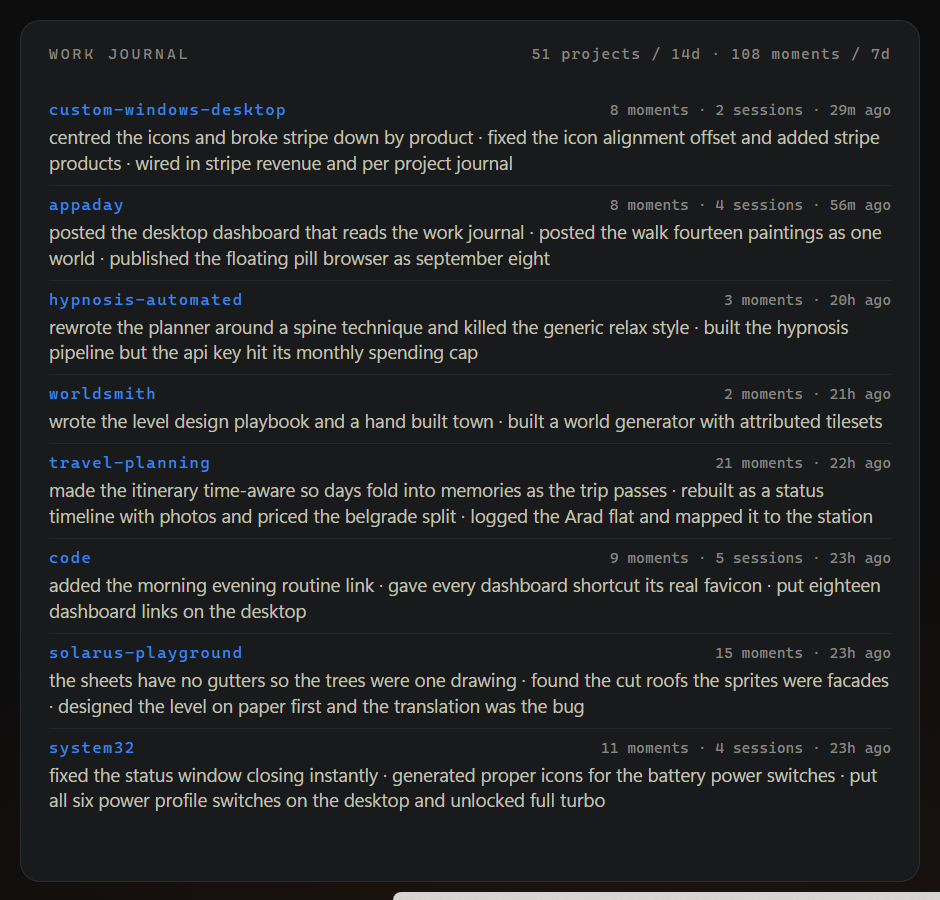
The panel groups fourteen days of it into one row per project. Each logged line is already a summary of a single turn of work, so the row is a summary of summaries, and outcomes beat requests — what got finished, not what was asked for. It replaced an earlier panel that guessed the same thing from directory modification times and said it much worse.
Which produces a small loop I did not expect to find on a wallpaper. The agent writes
a line when it finishes something; the desktop reads the file and shows it back. The
appaday row in the screenshot above opens with posted the desktop
dashboard that reads the work journal
— that is this page, on the machine that made
it, in the words the thing that made it wrote down at the time. The row above it is this
project, reporting that it centred the icons
, which is why the screenshots here
were taken twice.
What it costs
- render
- one headless pass, 1.5–3 s
- refresh
- every 5 min, CPU sampled every 1 min
- steady state
- ~1% of one core
- wallpaper
- 3000×2000, ~620 KB
- icons placed
- 28 of 28, pixel-exact
The morbid thing in the top left is a life clock: four thousand weeks, counted down.
It was added as a somewhat morbid but funny time left clock
and described in the
same breath as something that would probably get removed later. It is still there.